 Yelp
Yelp Thumbtack
 Facebook
 Instagram
 Google Local Services Ads
01
A reply about their actual job
Use the customer's inquiry and your business information to start a useful conversation.
Facebook auto responder
Keep up with Messenger inquiries and Facebook Lead Ads. Respond to supported leads in under 2 seconds, answer with your business information, and collect the details your team needs.
7 days to try it Cancel anytime
Choose Messenger, Lead Ads, or both. Each channel has its own monthly price.
One platform. The channels you already use.
Keep doing what you do best
Give interested customers a clear next step while your team handles the day.
Use the customer's inquiry and your business information to start a useful conversation.
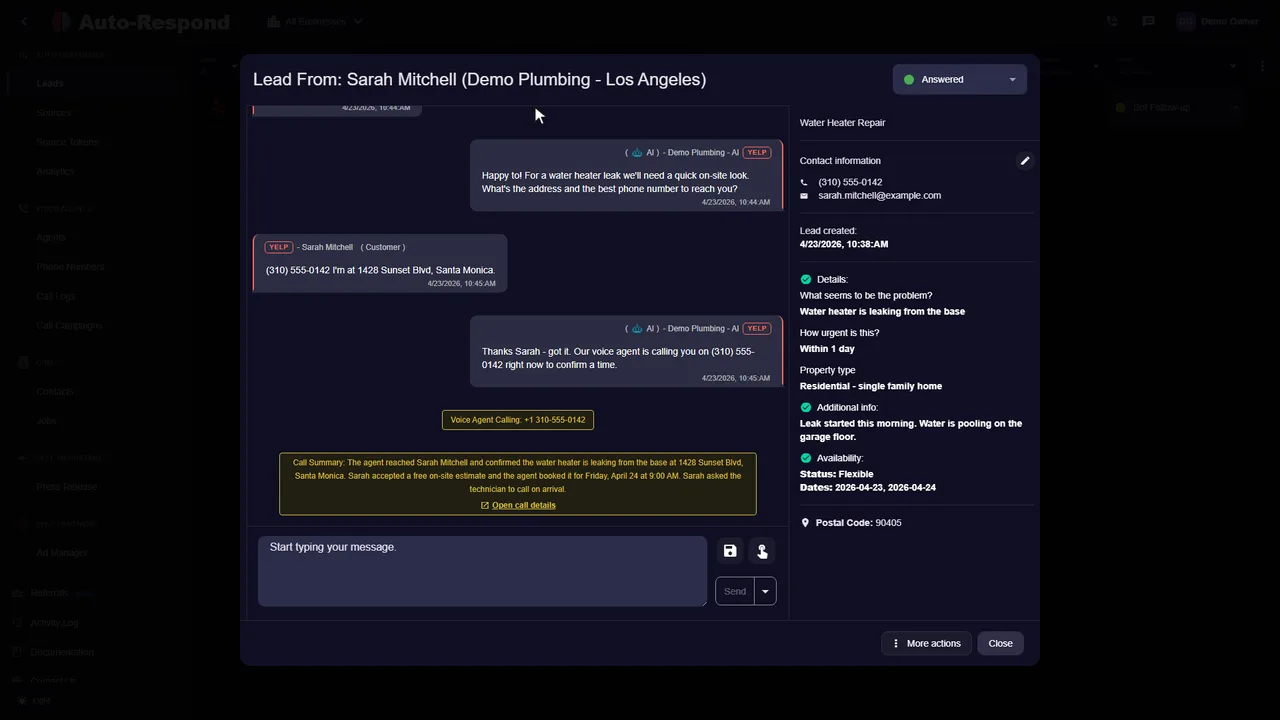
Collect the service needed, location, and timing using the qualifying instructions you choose.
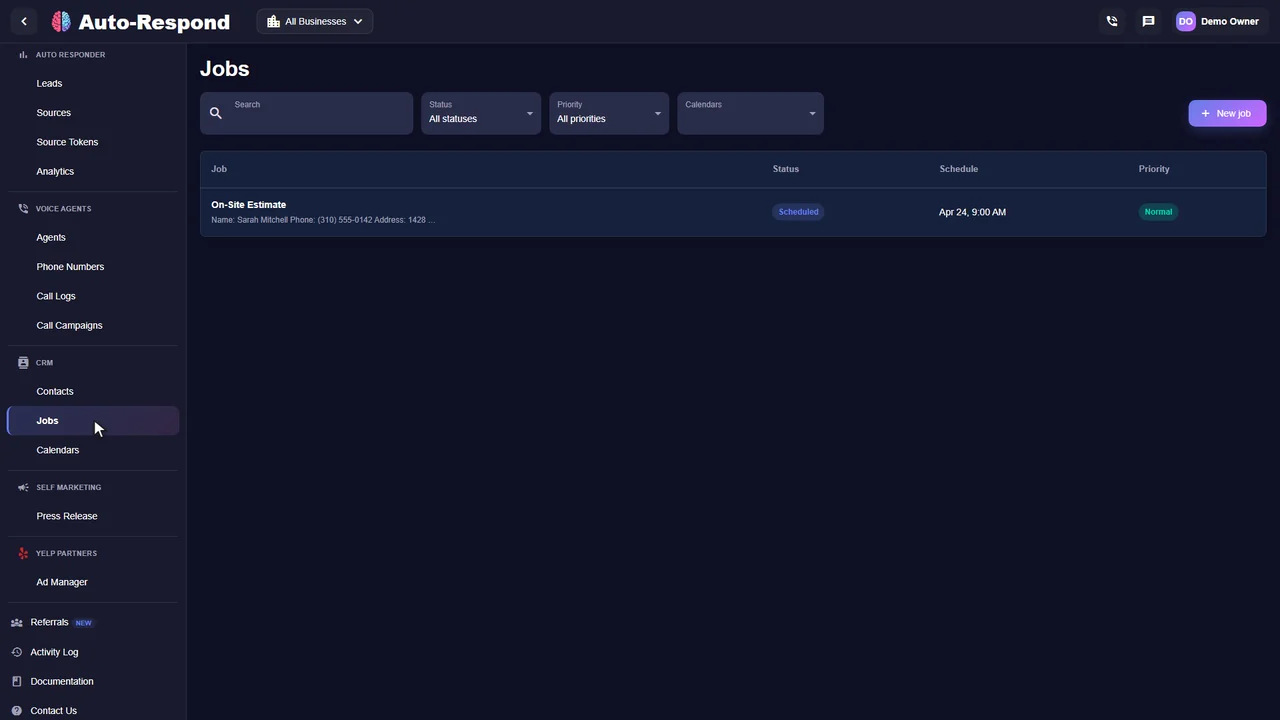
Offer appointments when scheduling is enabled and keep the lead details together for your team.
Start a useful conversation when someone messages your business. Answer questions and collect the service details with a Messenger connection at $49/month.
Follow up on supported form submissions with a separate Lead Ads connection at $19/month. Optional voice callback needs a callable number and is billed separately.
See the actual product
Watch the product walkthrough, then try it with your own business.
Recorded with a demo business. A walkthrough of the product, not a customer result.
Simple to start. Yours to control.
Tell Auto-Respond what you do and how you want to respond. Test the experience before turning it on for customers.
Set up my businessSign up at https://app.auto-respond.com. The 7-day free trial covers Facebook Messenger, Facebook Lead Ads, Instagram, and the voice agent.
Authorize Auto-Respond through Meta's official login. It connects the Messenger Platform for Page DMs and the Lead Ads webhook for form submissions in one flow.
Paste in services, pricing ranges, service area, hours, and the questions you ask on every job. Every reply is grounded in this, so the AI never makes up a price.
Define what a good lead looks like and what to ask - scope, urgency, timeline, budget. The AI runs this conversation in Messenger and against the Lead Ad form answers.
Set the sequence for leads who go quiet: a day-1 nudge, a day-3 check-in, a day-7 last call. The AI runs it automatically and stops the moment the lead replies or books.
The next Messenger message or Lead Ad submission triggers the auto-responder instantly. Watch the first conversations land in the dashboard, then leave it running.
Clarity for your team
Follow the conversation, review the customer's details, and see the next action in one place. These are real product screens from our demo business.
Know the price before you start
Try the response flow with your business. Review the conversations, see how it fits your day, and decide from there.
Facebook auto responder
Facebook Lead Ads is a separate channel at $19/month.
See how it works for your business.
Start my free trial No setup fee. No long-term contract.A few things you might be wondering
The details to help you decide.
Explore the help centerConnect your Facebook Page to Auto-Respond through Meta's official Messenger API, paste in your services, pricing, and hours, and turn it on. From that point every message that lands in your Page inbox gets an instant AI reply, day or night. The reply is not a canned "thanks for reaching out" - it reads what the person asked, answers it from your knowledge base, asks the qualifying questions that matter for the job, and offers a time to book. You can read every conversation in the dashboard and adjust the script anytime.
Yes, and this is where most of the money is. A Facebook Lead Ad form is a two-tap submit, so the person barely paused their scroll and forgets you quickly. Auto-Respond fires the first reply the instant the form is submitted, then runs an automated follow-up sequence over the next several days for anyone who does not answer - a nudge on day 1, a value-led check-in on day 3, a last call on day 7. The cadence is yours to set. Plenty of leads ignore the first message and answer a later one.
Yes. Auto-Respond runs on Meta's official Messenger Platform and Lead Ads webhook APIs - the same surfaces large customer-service tools are built on. Messaging follows Meta's 24-hour standard messaging window and approved message tags, so replies stay compliant and your Page stays in good standing. Nothing here scrapes or automates against Meta's terms; it uses the integrations Meta publishes for exactly this purpose.
Instantly. The Page-message webhook and the Lead Ad webhook both fire in real time, so the AI is reading the inbound the moment it lands and the first reply goes out in under 2 seconds. That window matters: contact rates on paid social leads fall off a cliff after the first few minutes, so the difference between an under-2-second reply and a 20-minute reply is often the difference between a booked job and a dead lead.
Both, from one inbox. Messenger DMs (including replies to your posts and ads that open a chat) are one channel; Facebook Lead Ad form submissions are another. Auto-Respond auto-responds to each, with messaging-appropriate templates for the chat thread and lead-form-appropriate qualification for the form fields. Instagram DMs and Lead Ads run on the same Meta connection if you sell there too.
Facebook Messenger auto-response is $49/month per Page. Facebook Lead Ads auto-response is $19/month. Add the AI voice agent - so a lead with a phone number gets a call, not just a text - at $10/month per number plus $1/minute. No setup fee, no per-lead fee, 7-day free trial with everything on.
It books. Once the conversation qualifies the lead, the AI checks your live calendar, offers real open slots, confirms the one the customer picks, and pushes a job summary to your phone. You are not copying details into a calendar after the fact - the appointment is already on it before you have read the thread.
It escalates with context. You set the triggers - an explicit "can I talk to a person", a high-value job indicator, an unusual question - and the conversation routes to your phone with the full history attached. The customer never has to repeat what they already told the AI, and you pick up mid-thread instead of cold.
Routing and responding are two different jobs. If your goal is to push the lead into Slack, your CRM, or a Google Sheet, that is covered in our guide on sending Facebook and Google ad leads to Slack and CRM. This page is about the reply itself - the conversation that qualifies and books the lead. Most service businesses run both: route the data for visibility, and let Auto-Respond actually answer and follow up so the lead does not go cold while it sits in a CRM nobody is watching.
Your next inquiry could be any minute
Built around your business. Ready when your customers are.