Calls New Leads
Calls new leads instantly, qualifies, answers questions, and books appointments while they're hot.
We use cookies and measurement tools from Google and OpenAI, and session recording, to measure our ads and improve this site. By continuing to browse, you agree. You can change this anytime. Privacy Policy
Auto-Respond is an AI auto responder and voice agent that can reply to, call back and book the leads you already pay for, day or night.
 Yelp
Yelp  Thumbtack
  Facebook
  Instagram
  Google Local Services Ads
 Meet the Auto-Respond mobile app. Review new inquiries, stay close to every conversation, and manage follow-ups from your phone.
Already have an account? Sign in to the Android app with your existing credentials.
Calls leads instantly. Answers your phone. Books appointments.
Explore the full AI voice agent workflow for lead callbacks, phone answering, qualification, and booking.
Calls new leads instantly, qualifies, answers questions, and books appointments while they're hot.
Answers calls 24/7, handles questions, gives quotes, takes notes and books jobs.
Upload a List and AI calls hundreds of old customers to reactivate and book.
Connect supported lead sources, review your business details, and configure channel-specific response workflows in Auto-Respond.
Create your Auto-Respond account and select which lead channels you want to configure: Yelp ($99/mo), Thumbtack ($99/mo), Facebook Messenger ($49/mo), Facebook Lead Ads ($19/mo), Instagram ($49/mo), Google Local Services Ads ($49/mo), or AI Voice Agent ($10/mo phone + $1/min). Pay only for the channels you activate.
Connect each supported source using the setup available for that channel. Some sources use account authorization, while custom CRM connections depend on the API or webhook access that CRM provides.
Add or review your services, pricing, business hours, service area, and brand details. These inputs control the response rules and the prices or ranges the AI can use.
Set the brand voice, escalation rules, quote thresholds, and the questions that can trigger an optional outbound AI voice call.
Auto-Respond applies the workflow selected for each source, including follow-up rules, booking or handoff, and optional AI voice calls.
Review response timing, escalations, and the accuracy of configured quotes and questions. Adjust each source workflow from your own operating data instead of assuming a conversion result.
Real screens from the Auto-Respond product tour. Connect a source, teach the AI your business rules, follow every conversation, and see the appointment land in Jobs.
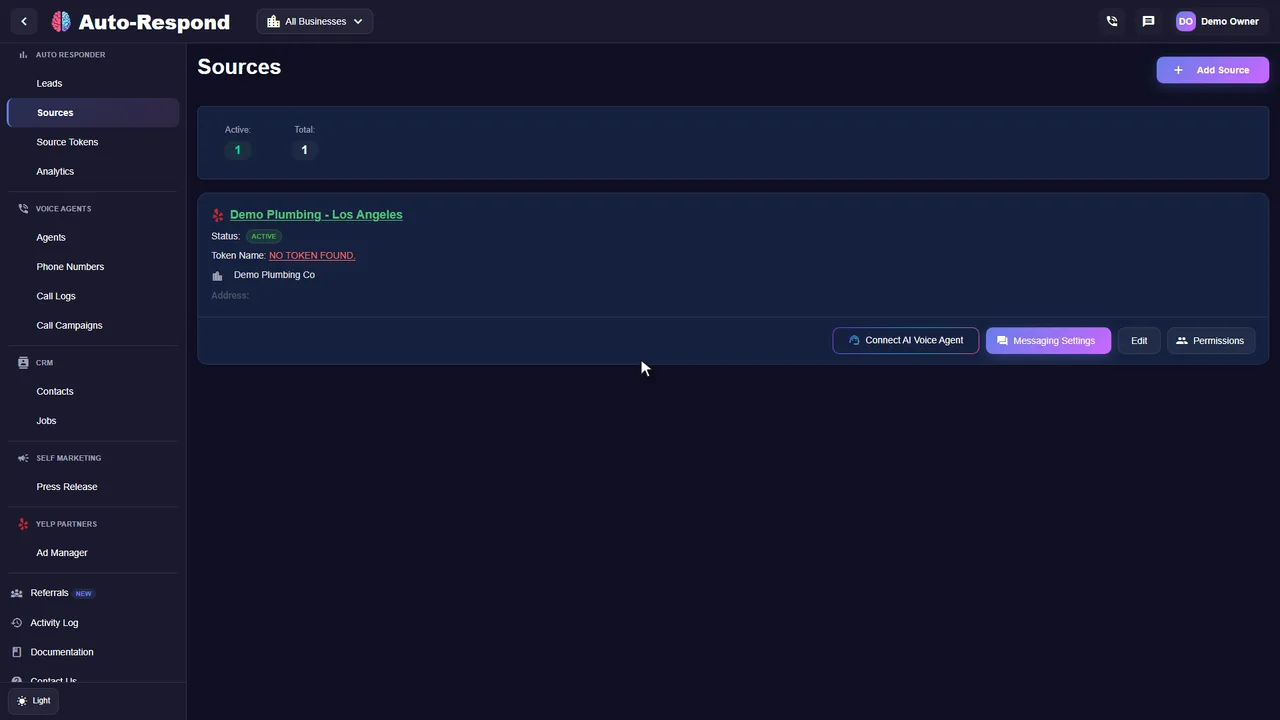
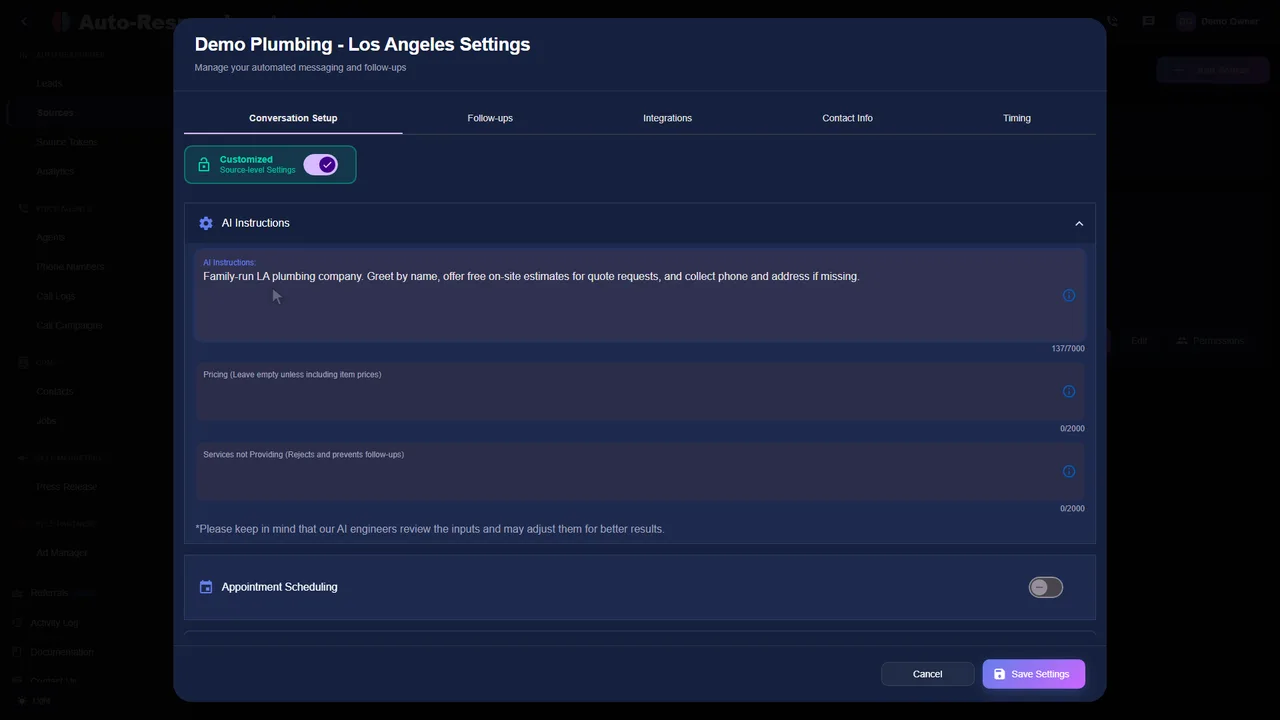
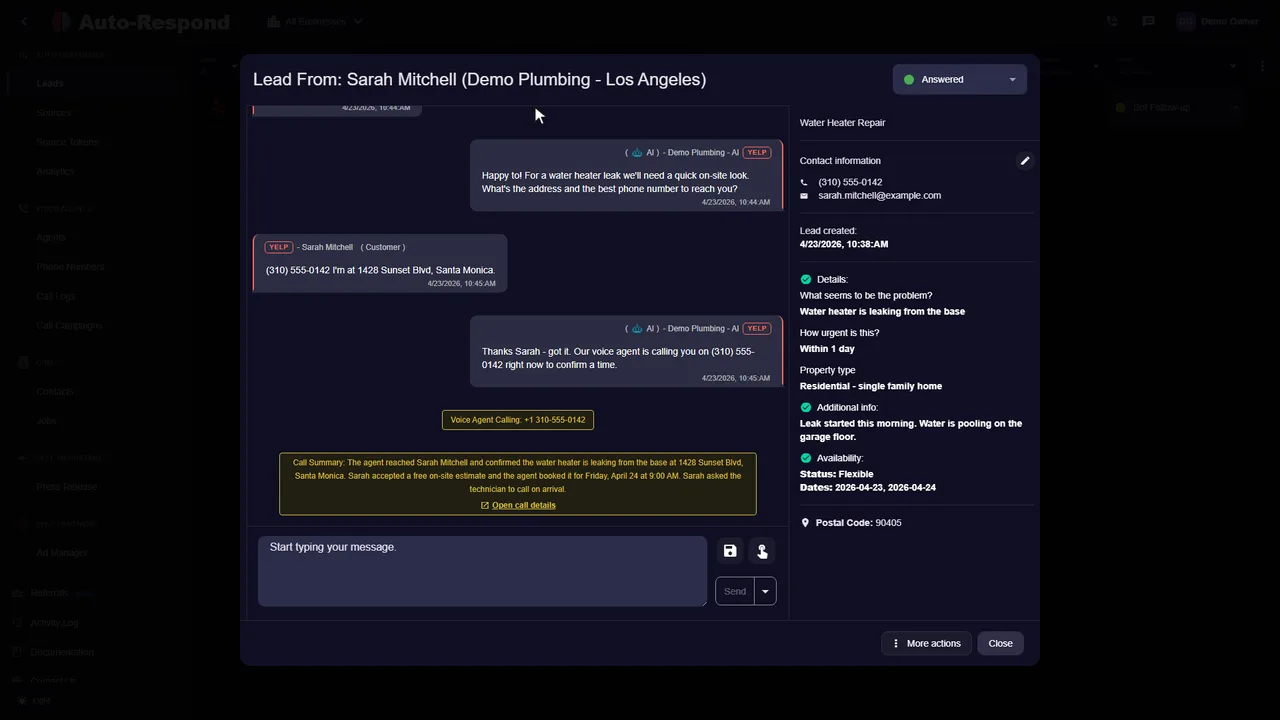
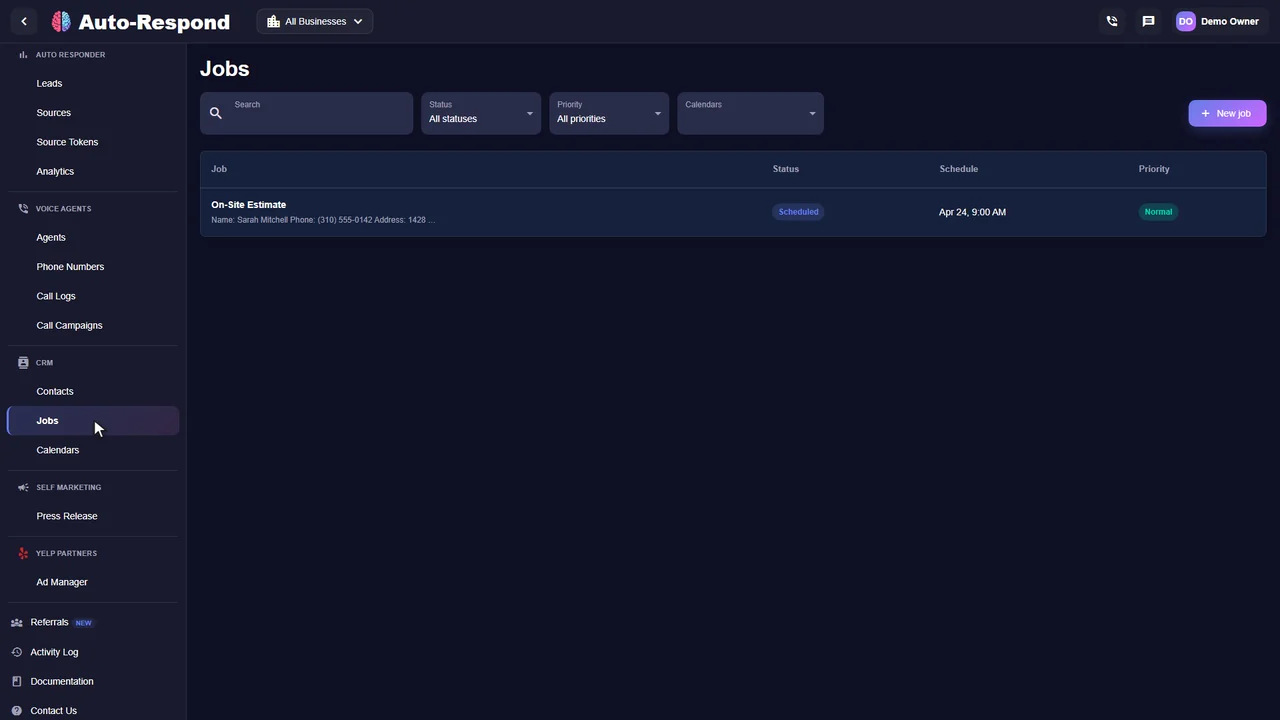
Set the facts the AI may use, connect supported lead channels, and choose when a conversation hands off to your team.
Uses the services, prices, rules, and instructions you approve for each connected business.
Creates a context-aware first reply in under 2 seconds using the rules you set for each connected channel.
Builds quotes from the lead details and the services, prices, and rules you configure.
Runs configured follow-up sequences and stops when the lead replies or books.
Asks the questions you configure, routes the conversation, and can book an appointment using your business rules.
Tailor every aspect of responses to match your brand voice and business requirements.
Receives supported lead events and applies the response workflow configured for that channel.
Add as many staff or team members as the business needs.
Handles supported marketplace enquiries, instant lead callbacks, and inbound phone answering from one dashboard.
Control which services, prices, rules, and answers the AI may use.
Choose from the supported integrations shown below. Setup time depends on the connected account and provider. For how auto replies work on Yelp, read our Yelp auto responder guide.
Thumbtack is identified as a compatible third-party connection. Auto-Respond is an independent service.
Connect your supported lead sources, add the AI voice agent, and send qualified enquiries into the CRM your team already uses.
A new message or phone enquiry arrives from a connected source
The enabled workflow replies, calls back, and asks your qualifying questions
Scheduling rules offer and record the next available appointment
The record syncs to a connected CRM or is handed to your team
Side-by-side feature matrix. Speed-to-lead, after-hours coverage, voice callbacks, and pricing model - exactly what matters when you're paying for every lead.
| Feature | Auto-Respond | Manual Response | Answering Service |
|---|---|---|---|
| First-response time | Under 2 seconds | 15 min – 4 hours | Varies by provider |
| After-hours coverage | 24/7 | No | Limited / extra cost |
| Reads actual lead intent | Yes - every reply tailored | Yes (when human replies) | Yes |
| Carries full conversation forward | Yes - until handoff or booking | Yes (manual) | Yes (live transfer / message) |
| AI voice agent callback | Yes - instant callback | No | No - inbound only |
| Books appointments directly | Yes - into your calendar | Yes (manual scheduling) | Sometimes |
| Multi-platform (Yelp + Thumbtack + FB + LSA) | Yes - single dashboard | Yes (juggle inboxes) | Phone only |
| Pricing model | Per-source: $19–$99/mo + $1/min voice | Your time × hourly cost | Monthly plans or per-minute billing |
| Setup time | Under 2 minutes, no code | None - but ongoing time cost | Script training required |
| Conversion lift vs manual response | More booked jobs from instant reply | Baseline | Limited - slower, scripted |
Speed-to-lead research cited across our content: MIT (Oldroyd, 2007) and Harvard Business Review (2011). See our methodology page for how we define and measure response time.
Per-source monthly pricing. Under 2-minute setup. Voice calls at $1 per billable minute. Cancel online.
Pay only for the sources you connect
Pricing per source
A 7-day trial applies only to eligible first-time customers and locations only when the exact order summary shows it. Reconnected, transferred, reactivated, or previously subscribed locations do not automatically receive another trial.
Pay only for the sources you connect
A 7-day trial applies only to eligible first-time customers and locations only when the exact order summary shows it. Reconnected, transferred, reactivated, or previously subscribed locations do not automatically receive another trial.








Pricing per source
Each active source is a monthly recurring charge. Activating a paid source mid-cycle may create the prorated charge shown before confirmation. Voice Agent numbers are $10/month each; inbound and outbound voice usage is $1 per billable minute. Completed non-batch calls of at least 10 seconds round up to the next whole minute per call. Eligible completed batch-call durations are aggregated within each immutable usage report and that aggregate rounds up to the next whole minute. Cancel online from Billing.
Real businesses using voice agents and auto-response to close more deals.
“This system completely transformed our lead response process. It feels like having a dedicated team member who never sleeps and always responds professionally. Our booking rate increased just from faster response times. it's honestly like magic.”

“I thought it was just an auto-responder, but it's a full employee. It texted the Yelp lead, then immediately called them, negotiated the time, and booked the estimate. I just woke up to the notification. Insane.”

“The batch calling feature saved our month. We uploaded our old leads, and the AI called them all. We filled our schedule just from old customers.”

“Look, construction gets busy. When Yelp blows up with storm damage calls, this AI keeps up when we can't. Customers tell us 'thanks for the quick response'. they have no idea it's AI! We're booking more jobs because we never miss a lead.”

“It handles everything. A lead came in from Thumbtack, the AI texted them, they didn't reply, so the AI called them. It answered their questions about pricing and booked the job. It's a complete sales machine.”

“I'm usually in bed by 10 PM, but HVAC emergencies don't follow business hours. Now when someone reaches out at 11:47 PM, the AI is there immediately. By morning I have conversation history, customer info, and often a scheduled appointment. Revenue is up year-over-year.”

Review the Terms of Use, Privacy Policy, and Billing, Cancellation & Refund Policy.
Configure lead replies, quotes, follow-ups, and team handoff around the facts and rules your business approves.
Questions?