 Yelp
Yelp Thumbtack
 Facebook
 Instagram
 Google Local Services Ads
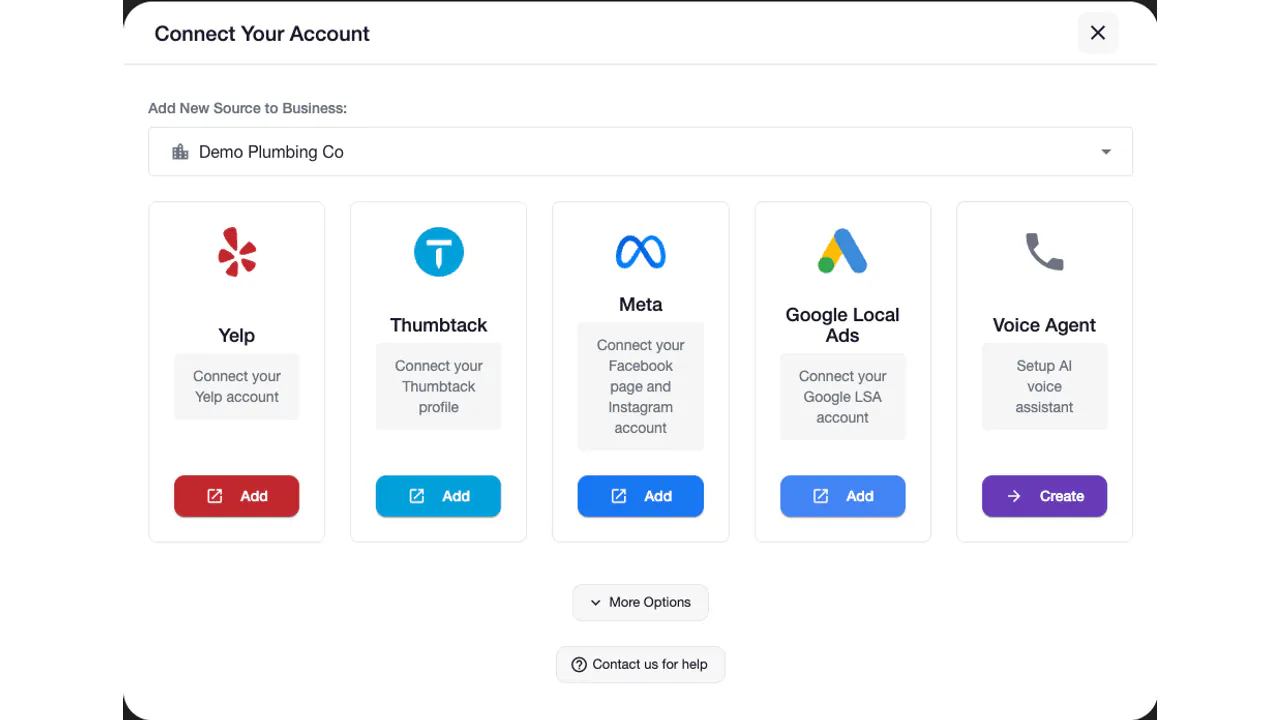
From browsing to asking
A prospective customer reaches out through your DMs. Respond with useful information about your service while their question is still fresh.
We use cookies and measurement tools from Google and OpenAI, and session recording, to measure our ads and improve this site. By continuing to browse, you agree. You can change this anytime. Privacy Policy
Instagram auto responder
An Instagram auto responder answers the direct messages people send your Instagram business account, even when nobody has the app open. Auto-Respond replies to Instagram DMs in under 2 seconds with your business details, asks your qualifying questions and moves interested customers toward a booking, for $49 a month per connected account.
7 days to try it Cancel anytime
Connect your eligible Instagram business account through Meta.
One platform. The channels you already use.
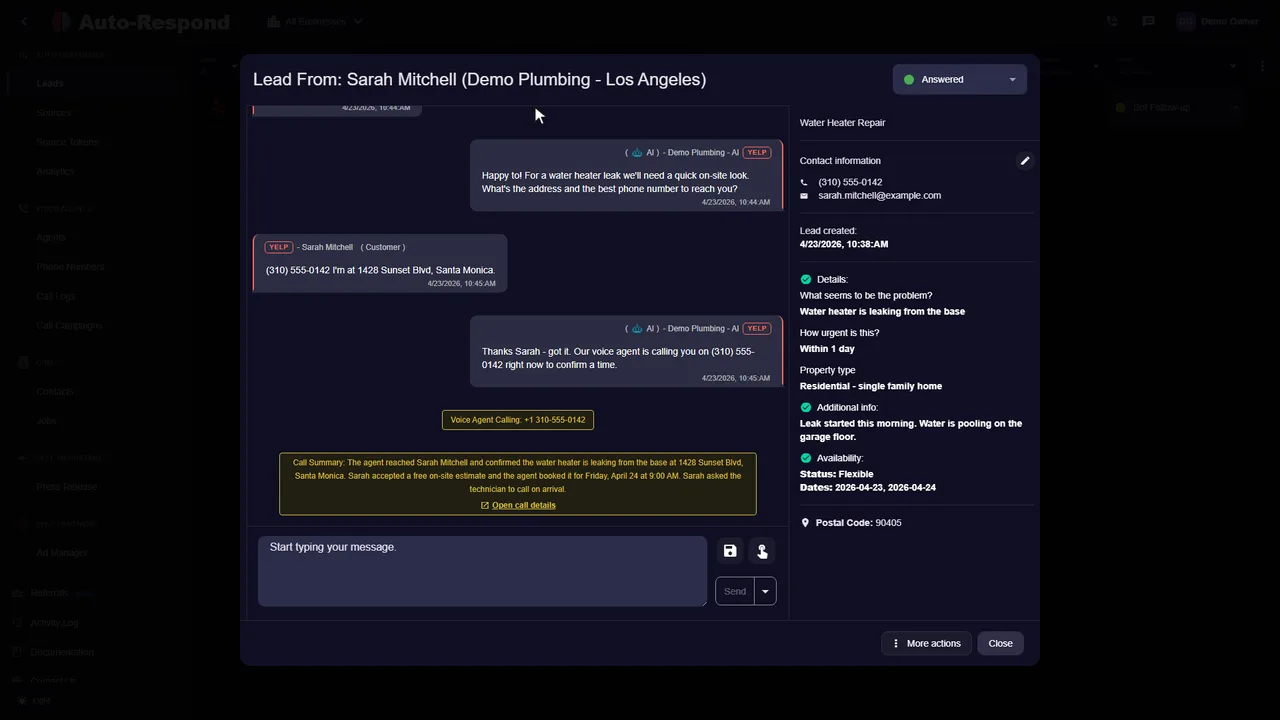
It answers direct messages: the DMs people send your Instagram Business or Creator account, which is where most service inquiries on Instagram start. Each conversation arrives in Auto-Respond with the person's Instagram handle and the full thread, and the AI replies inside that same thread, so the customer never leaves Instagram.
A prospective customer reaches out through your DMs. Respond with useful information about your service while their question is still fresh.
Use your qualifying instructions to collect the job location, timing, and service needed. When scheduling is enabled, help them find an available time.
Instagram already offers free automation: up to four frequently asked questions shown when someone opens a chat with you, plus the Inbox automations in Meta Business Suite, such as an instant greeting, an away message and keyword replies. If you only need to answer the same few questions, start there; our guide to setting up Instagram auto replies walks through each one.
The built-in tools send the text you saved. They cannot tell a customer asking about a deck repair from one asking about a new build, quote from your price ranges, or offer a time on your calendar. That is what Auto-Respond adds: a reply written to the message in front of it, the questions you would ask, and a booking when the customer is ready.
DMs are read on a phone, often between other things, so the first reply should be short enough to read in one glance and easy to answer with one tap of the keyboard:
Illustration: the shape of a good first DM reply (placeholders, not a real customer)
DM: "Do you do kitchen backsplashes? How much?"
Reply: "Yes, we install backsplashes in [area]. Most run [your range] depending on size and tile. Roughly how many square feet is it? We can come measure on [day]."
If you also take messages on your Facebook Page, the Facebook auto responder runs on the same Meta login as a separate source.
See the actual product
Watch the product walkthrough, then try it with your own business.
Recorded with a demo business. A walkthrough of the product, not a customer result.
Simple to start. Yours to control.
Check two things first: the account is set to Business or Creator, and it is linked to a Facebook Page you manage. Then you sign in through Facebook and pick the account. The Instagram source guide covers troubleshooting.
Set up my businessSign up at app.auto-respond.com and review the offer shown for each source. Instagram and Facebook Messenger are separate billable sources even when connected through the same Meta authorization.
Link your Instagram Business or Creator account through the Facebook Business connection. This uses Meta's official Instagram messaging API, so replies are logged natively in your Instagram inbox. Takes under 2 minutes.
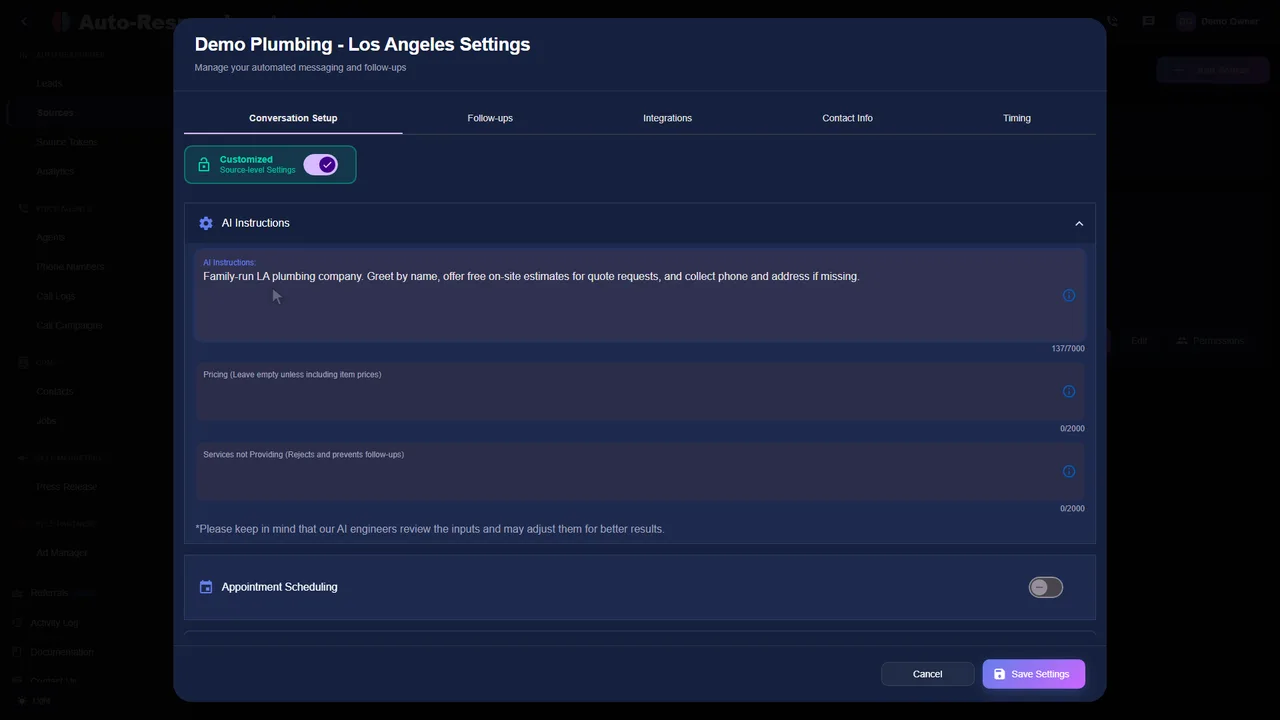
Paste in your services, pricing ranges, service area, hours, and the questions you ask on every job. The AI grounds every DM reply in this data instead of guessing.
Tell the AI what to ask: job type, location, timeline, budget. Organic DMs get the full qualifying conversation; Lead Ad submissions get an instant follow-up that already references their answers.
Set the cadence for leads who go quiet after the first reply, such as a nudge after a few hours, another the next day, a final check a couple of days later. The sequence pauses automatically the moment the lead replies or books.
Flip it on. The next DM, Story reply, or Reel reply that lands gets an AI response in under 2 seconds, qualified, and pushed toward a booking, while you are on a job or asleep.
Clarity for your team
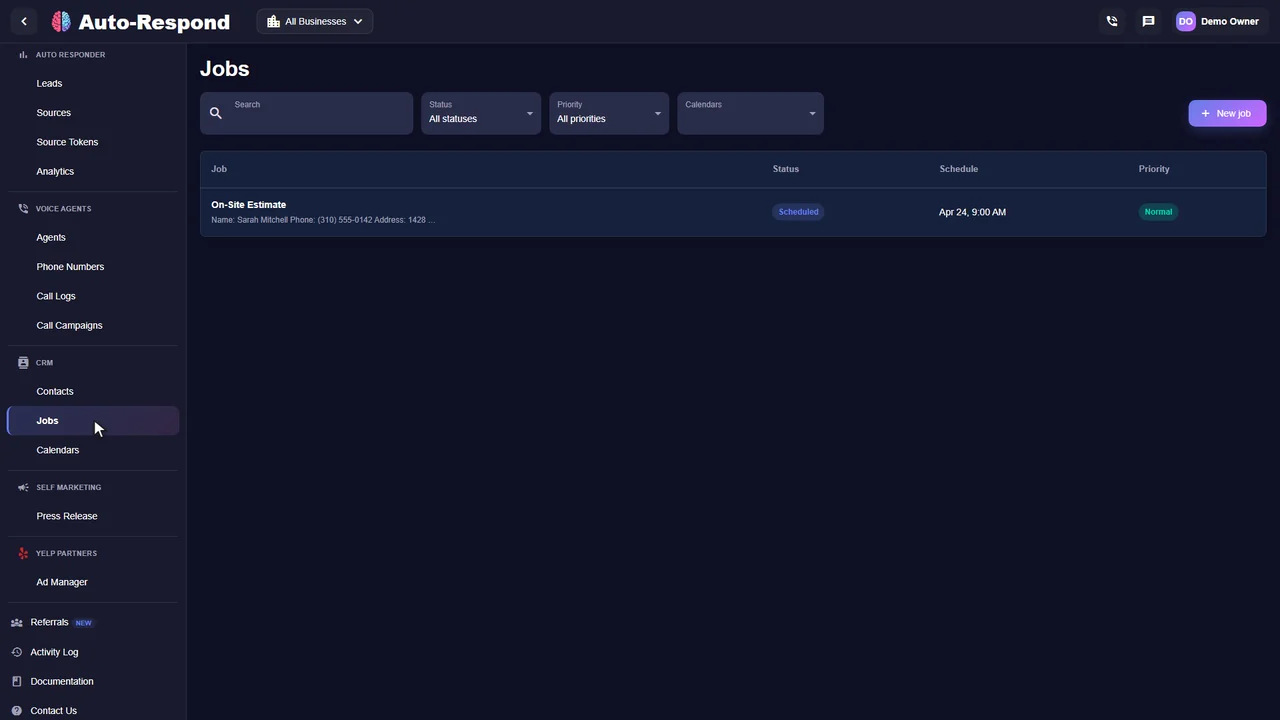
Each Instagram conversation shows the thread, what the customer needs and the next step, next to your leads from every other source. These are real product screens from our demo business.
Beyond the Business or Creator account and the Facebook Page link named in the setup steps above, three Instagram settings decide whether an auto reply can run: how you switch to a professional account, the permission that lets other apps see your messages, and Instagram's access to the Meta Business Suite Inbox. When an auto reply never sends, check these first.
| Setting | Where to change it | Worth knowing |
|---|---|---|
| Professional account | Your profile, then More, then Account type and tools under For professionals, then Switch to professional account. Choose Business for a service company. | FAQ responses exist only on business and creator accounts. A private personal account becomes public when you switch, and pending follow requests are accepted. |
| Allow access to messages | Your profile, then Menu, Messages and story replies, Message requests, and the toggle under Connected tools. | With it off, your DMs can only be read and answered inside Instagram, so neither Meta Business Suite nor a connected app sees them. |
| Instagram in Meta Business Suite | Meta Business Suite, Inbox, the Instagram tab: confirm access (allowed by default) and log in to Instagram. You need full control of the Instagram profile. | Without it, Instagram messages never reach the Inbox where Meta's automations run. |
The Connected tools toggle also works in reverse: switching it off stops Meta Business Suite and connected apps from seeing your DMs, one way to cut off a tool you no longer use. If your account does not appear when you connect it to Auto-Respond, check its Facebook Page link; the Instagram source guide in our docs walks through it. Sources: Instagram Help Center and Meta Business Help Center, checked October 2026.

Instagram's built-in auto reply is its frequently asked questions tool. You save up to four questions, each with an optional automated response, and Instagram shows them to people who open a chat with your account. A person who taps a question receives the response you saved. Setting it up takes five steps in the app (Instagram Help Center, checked October 2026):
The tapped question lands in your message Requests, and you have to accept the request before you can write back yourself. The automated response belongs to the question the person picked, so write each answer to move the job forward: ask for the ZIP code, the size of the job or a photo.
If you never saved your own questions, a business account shows four suggested questions that Instagram picks from your account category; a shop, for example, gets questions about orders and returns. Check what your category produces before you leave them on, or replace them with your own.
Example: FAQ entries for a home service business (placeholders, not a real customer)
Question: "What areas do you cover?" Response: "We work in [your towns]. Send your ZIP code and the job you need, and we'll reply with a price range during [your hours]."
Question: "Can I get a quote from photos?" Response: "Send two photos and the rough size of the area. We'll reply with a range, or offer a time to come and look."
Show Questions, the toggle under Messages, Tools, Frequently asked questions, is the one that enables automated responses, so switch it off there to stop your saved answers. The suggested questions Instagram adds on its own have their own switch: your profile, Menu, Business tools and controls, Frequently asked questions, then Show questions (Android) or Show questions in chat (iPhone).
Meta Business Suite answers Instagram DMs automatically from its Inbox once your Instagram business account is connected there. These steps are for the desktop version; keyword and comment to message automations exist only there. The path from a template (Meta Business Help Center, checked October 2026):
To write your own rule instead, click Start from scratch, tick the Instagram channel, choose the condition New message received and add the action Send message.
The comment to message template (desktop only) sends a direct message to people whose comment on your post contains a keyword or phrase you chose. Ask people to comment a word such as QUOTE and each of them receives the same message, for example your price list or booking link. Auto-Respond works in the DM inbox, not on comments, so a comment campaign is set up here in Meta Business Suite.
Open Inbox, then Automations, and switch the automation off with the toggle under Status, or click Edit to change it. One other setting pauses them all: turning on Meta Business Agent pauses existing automations such as away messages and instant replies.
For apps that connect to Instagram through Meta's messaging API, which is how Auto-Respond connects, Meta sets the limits: the customer makes the first move, replies go out inside a messaging window, and where the law requires it the chat says it is automated (Meta for Developers, Instagram messaging documentation and the Messenger Platform and IG Messaging API policy, checked October 2026).
A connected app can message a person only after that person has messaged your account. So an app's auto reply answers people who reach out; it does not start conversations with strangers.
Beyond the 24-hour window described near the top of this page, a reply tagged as sent by a human agent gets a separate 7-day period, for conversations where a person on your team needs more time.
Where the law requires it, an automated chat says so at the start of a conversation, after a significant lapse of time, and when a chat moves from a person to automation. Meta recommends it even where no law requires it.
Choose by what your DMs ask for. Instagram's FAQ responses and Meta Business Suite's automations send text you wrote in advance; an AI auto responder writes each reply from the customer's message and your business details. Find the row that sounds like your inbox:
| Your DMs mostly | Best fit | Keep in mind |
|---|---|---|
| Ask the same few things: hours, area, whether you do a job | FAQ responses in the Instagram app | Sends your saved answer when someone taps one of your four questions. |
| Arrive at night and on weekends | Away message in Meta Business Suite | Tells people when you will be back; it cannot quote or book. More in our guide to after-hours auto replies on Facebook and Instagram. |
| Come from posts that ask people to comment a word | Comment to message in Meta Business Suite | Every commenter gets the same text. |
| Ask for prices, dates and whether you cover their area | An AI auto responder such as Auto-Respond | Replies in under 2 seconds from your price ranges and service area, asks your qualifying questions and offers a time when scheduling is on. $49 a month per connected Instagram account; other channels are on the pricing page. |
If Auto-Respond answers your DMs, switch off the instant reply and away message in Meta Business Suite for that account, so a customer gets one first reply rather than two: a saved greeting and a written answer.
Speed is what the last row buys. In Harvard Business Review's study of online sales leads, companies that tried to contact a lead within an hour were nearly 7 times as likely to qualify it as those that tried an hour later (HBR, "The Short Life of Online Sales Leads", 2011). If Instagram is one of several places customers reach you, lead response automation covers every supported source in one place.
Know the price before you start
Instagram is $49 a month for each connected Instagram account, with no per-message fees or contract. Facebook Messenger is a separate $49 source even when both use the same Meta login. See every channel on the pricing page.
Instagram auto responder
Per connected Instagram account. Facebook Messenger is a separate source.
See how it works for your business.
Start my free trial No setup fee. No long-term contract.A few things you might be wondering
Meta's rules, follow-ups, cost and what your followers see.
Explore the help centerYou connect your Instagram Business or Creator account to Auto-Respond through Meta's official Instagram messaging API (the same API family that powers Messenger). After that, every DM that lands in your inbox gets an instant AI reply that reads what the person actually wrote, answers their question, asks a couple of qualifying questions, and offers a booking. There is no separate app for your customer to install and nothing for you to babysit. Setup takes under 2 minutes through the Facebook Business connection, and the next DM after you flip it on gets an instant reply.
Yes, and this is where quiet leads get recovered. Plenty of people send one DM, get a reply, then go quiet because they got busy, not because they lost interest. Auto-Respond runs an automated follow-up sequence on those threads: a nudge a few hours later, another the next day, a final check a couple of days after that, each one written in context rather than a copy-pasted "just checking in." You set the cadence and the stop conditions, and the AI pauses the moment the lead replies or books. You are not manually scrolling back through old DMs trying to remember who ghosted you.
Yes. Auto-Respond uses Meta's official Instagram messaging API, which is approved for Instagram Business and Creator accounts. It is the same sanctioned surface that large customer-service platforms use, so replies are logged natively in your Instagram inbox and there is no risk of the account restrictions that come with unofficial automation bots. You need an Instagram Business or Creator account linked to a Facebook Page, both of which are free to set up.
The first reply lands in under 2 seconds from the moment the message arrives. That speed matters more on Instagram than almost anywhere else, because the person is still inside the app, still on your profile, and one tap away from messaging three competitors. A reply that arrives while they are still scrolling converts at a far higher rate than one that shows up two hours later when they have moved on.
Direct DMs, Story replies, Reel replies, and Instagram Lead Ad form submissions all land in the same inbox and all get an instant response. Organic DMs get a qualifying conversation, since you know nothing about the project yet. Lead Ad submissions get an immediate follow-up that already references the details the person filled in. Comment moderation is a separate thing and is not part of this; this covers the inbox and DM side.
Both. Instagram DMs and Facebook Messenger run on the same Meta messaging plumbing, so one connection covers your Instagram inbox, your Messenger inbox, and Facebook or Instagram Lead Ad submissions. You manage every Meta conversation from a single dashboard instead of bouncing between two apps. If Facebook is your bigger channel, the dedicated Facebook auto responder page walks through the Messenger side in more detail.
Instagram is $49/month per connected source or location. Facebook Messenger is a separate $49/month source even when both are authorized through the same Meta connection. There are no per-message fees or fixed-term contract. The optional AI voice agent, if you want to follow up high-value Instagram leads by phone, is $10/month per number plus $1/minute. Trial eligibility is shown before activation.
Most do not, because the reply is written to their specific message rather than pulled from a canned template. The AI reads "do you work in Tampa and what would a full repaint run" and answers that exact question with your real service area and a real price range. It does not open with a generic "thanks for reaching out, someone will be with you shortly." If a thread gets complicated or high-value, it hands off to you with the full conversation attached so you never re-ask what they already told the bot.
It escalates instead of guessing. You set the escalation rules, such as explicit requests for a human, job values above a threshold, or scope the AI cannot scope cleanly, and the conversation routes to your phone with the full DM history attached. The AI grounds every answer in the knowledge base you give it, so it quotes your pricing and service area rather than inventing numbers, and it punts to you the moment it hits the edge of what it knows.
Most businesses are fully set up in under 2 minutes, and the Instagram connection is the bulk of it. Link your Instagram Business account through the Facebook Business connection, paste in your services, pricing ranges, and service area, set the follow-up cadence, and turn it on. The next DM that lands after that is handled automatically.
Your next inquiry could be any minute
Built around your business. Ready when your customers are.