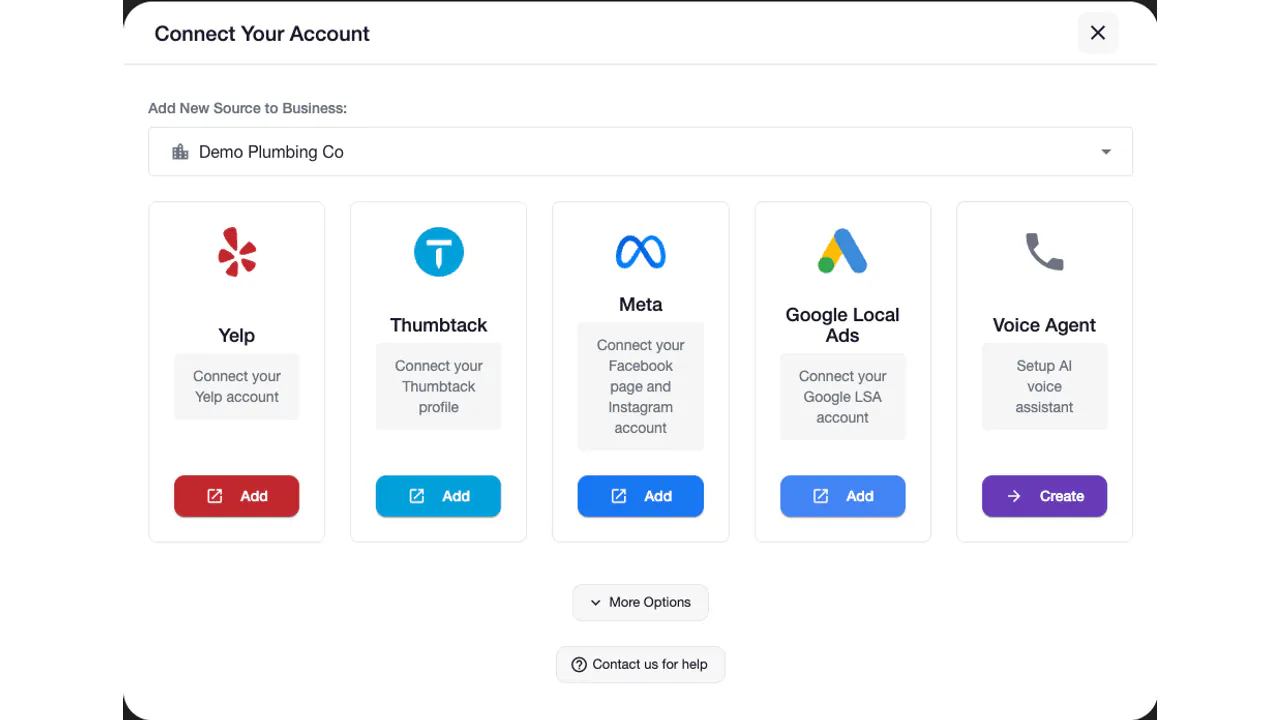
 Yelp
Yelp Thumbtack
 Facebook
 Instagram
 Google Local Services Ads
01
Answers when the office is closed
Evening, weekend and holiday calls reach a voice that knows your services, price ranges and service area, instead of a voicemail box.
After-hours answering service
An after-hours answering service answers your business calls when the office is closed, so evening, weekend and holiday callers get a real answer instead of voicemail. Auto-Respond's AI voice agent picks up your forwarded line, answers from your business details, collects the job, books it when scheduling is on, and transfers emergencies under rules you set.
7 days to try it Cancel anytime
You choose the hours it covers, which calls transfer to you, and what callers hear outside those hours.
One platform. The channels you already use.
Keep doing what you do best
Give night and weekend callers a real answer and a clear next step while your team is off.
Evening, weekend and holiday calls reach a voice that knows your services, price ranges and service area, instead of a voicemail box.
Calls that match your transfer rules, such as a burst pipe or a gas smell, go to your on-call number with a short private briefing first.
When scheduling is on, the agent offers open times from your calendar, so a night caller can hang up with an appointment instead of waiting for a callback.
Say a plumbing company forwards its line to the voice agent when the office closes, and a homeowner calls at 9:40 p.m. about water under the kitchen sink. This is how that call runs:
Every business already has some after-hours setup, even if it is only voicemail. The question is what the caller gets and what you find in the morning.
| Voicemail | Live answering service | AI answering service | |
|---|---|---|---|
| Who picks up | Nobody | An operator at the answering company | The voice agent on your forwarded line |
| What the caller gets | A recording and a promised callback | A message taken, or the script you supplied | Answers from your business details and a next step |
| Books the job | No | Depends on the provider | Yes, when scheduling is on |
| Emergencies | Heard when someone checks messages | Handled by the script you provide | Transferred by your rules, or a priority message |
| Message and marketplace leads | Not covered | Depends on the provider | Yelp, Thumbtack, Facebook, Instagram and Google LSA leads answered on the channels you connect |
| How the price works | Part of your phone service | Set by each provider; ask how calls, minutes and holidays are counted | $10 a month per number plus $1 per minute |
Pick people over AI when every urgent call needs a human judgment before anyone is dispatched, when intake is long and sensitive, or when callers must always reach a person and you have nobody on call to take transfers. For routine service calls (a quote, a booking, a question about your area or hours), an AI agent answers, qualifies and books without leaving you a callback list. Our AI lead response vs answering service comparison goes deeper on the trade-offs.
Your forwarding rule decides which calls reach the agent, its call hours decide when it answers them, and your voicemail message covers the rest.
| Forwarding rule | What happens | Common US codes (on / off) | Use it when |
|---|---|---|---|
| When not answered | Your line rings first; unanswered calls go to the agent | *92 / *93 | Your team answers in the day and the agent covers the rest |
| All calls | Every call goes straight to the agent | *72 / *73 | You close for the night or the weekend |
| When busy | Calls go to the agent while your line is in use | *68 / *88 | One person handles the phone and overflow needs a home |
Codes differ between carriers, and VoIP phone systems set forwarding in their admin settings instead. Check your carrier's current instructions; the call forwarding guide in our docs covers the common setups and how to test them.
The agent answers every day, around the clock, unless you set call hours. To cover only the hours you are closed, set day-by-day windows (for example, evenings and early mornings on weekdays and all day on weekends) and set the timezone in both the call hours and the agent's basic info. If you forward only unanswered calls, you can leave the agent on all day and let the forwarding rule decide which calls it gets.
Outside its call hours the agent plays your voicemail message, the caller can leave a message, and the call is still logged so you can follow up. Keep it short and specific about when you will call back, and leave the promotions out.
When you turn on call transfer, the default rules transfer a call only when the caller insists on a person after being offered help, when a booking cannot be completed, or when an urgent request is outside what the agent can handle. Add the triggers that matter in your trade, written plainly, for example: "Transfer if the caller mentions a gas leak, water damage or any safety emergency."
A burst pipe, a sewer backup, no water to the house.
No heat on a freezing night, a gas smell near the furnace.
An active leak during a storm.
Sparking outlets, a burning smell, a panel that will not reset.
Use a warm transfer: the agent calls your on-call number, tells your team member in private what the caller needs, and only then connects the caller. Only send transfers to a number someone answers at that hour. If nobody is on call overnight, switch transfer off for those hours and let the agent take a detailed priority message. For trade-specific setups, see how an AI voice agent handles HVAC emergency calls.
Callers hear your greeting and a voice and tone you choose. The agent never claims to be human, never denies being an AI and never presents itself as the owner or an employee. If a caller asks whether they are talking to an AI or whether the call is recorded, it answers directly and honestly. A caller who wants a person gets a transfer when your rules allow it, or a message taken for your team.
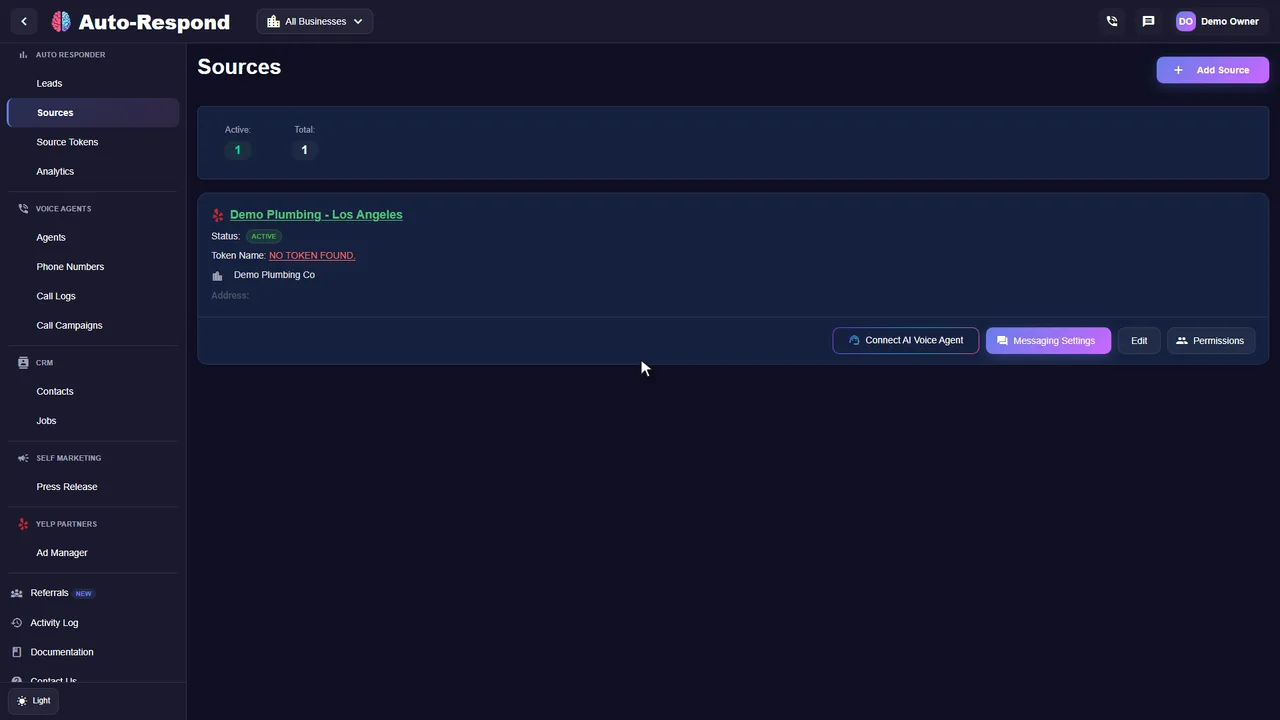
Plenty of after-hours inquiries arrive as messages, not calls: a Yelp Request a Quote at 11 p.m., a Thumbtack lead on Sunday morning, a Facebook or Instagram message from someone scrolling after dinner. On the channels you connect, Yelp inquiries get a job-specific response created in under 2 seconds, and Thumbtack, Facebook, Instagram and Google Local Services Ads leads get an instant reply. When a new lead includes a callable number, the voice agent can call it back instantly. See how lead response automation covers every supported channel.
See the actual product
Watch the product walkthrough, then try it with your own business.
Recorded with a demo business. A walkthrough of the product, not a customer result.
Simple to start. Yours to control.
Three decisions shape your after-hours coverage: which calls reach the agent, which hours it answers, and what callers hear outside those hours. The inbound call handling guide shows where each one is set.
Set up my businessCreate your account and add the voice agent. Eligible first-time customers get a 7-day free trial, and the order summary shows the price before you confirm.
Add your services, price ranges, service area and hours, plus what counts as an emergency for your trade. The agent answers from this information only.
Choose nights and weekends only, or every hour of every day. Set the timezone in both places so the hours line up with your clock.
Decide which calls go to your on-call number and what callers hear outside the agent's call hours.
Use no-answer forwarding to catch the calls your team misses, or forward every call when you close for the night.
Call your business number, let it forward, talk to the agent, then open Call Logs and check the transcript.
Clarity for your team
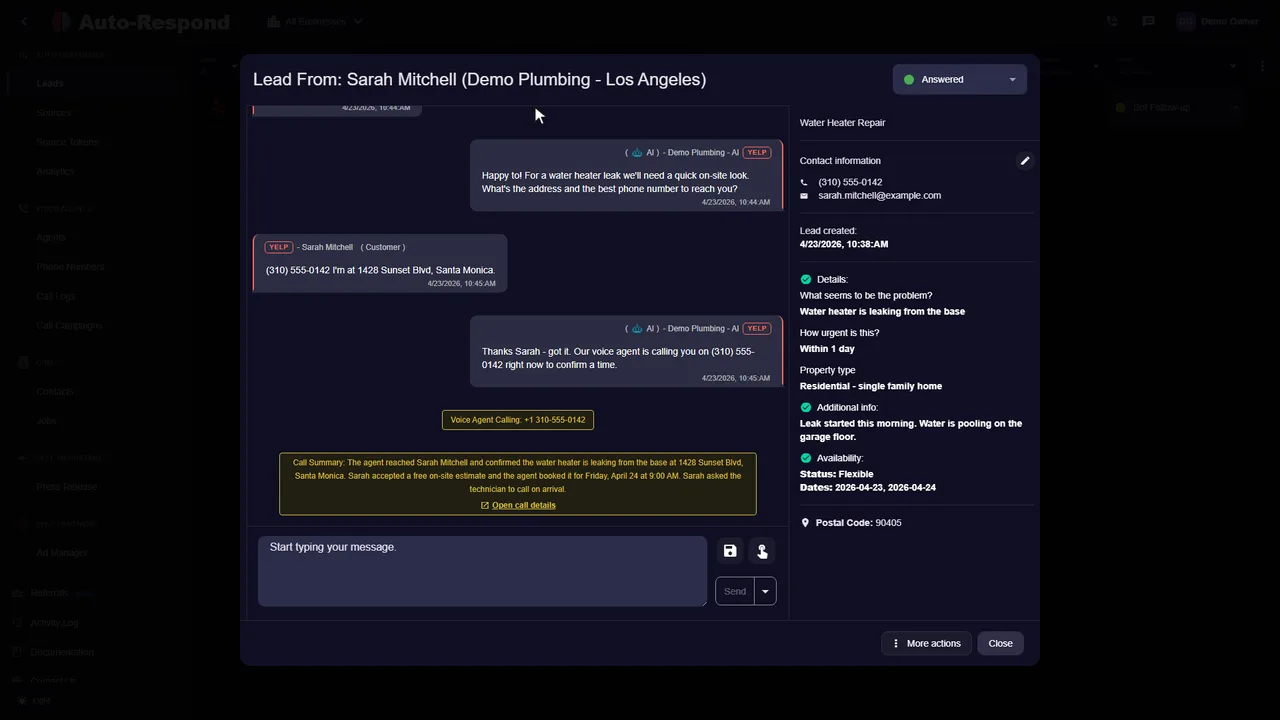
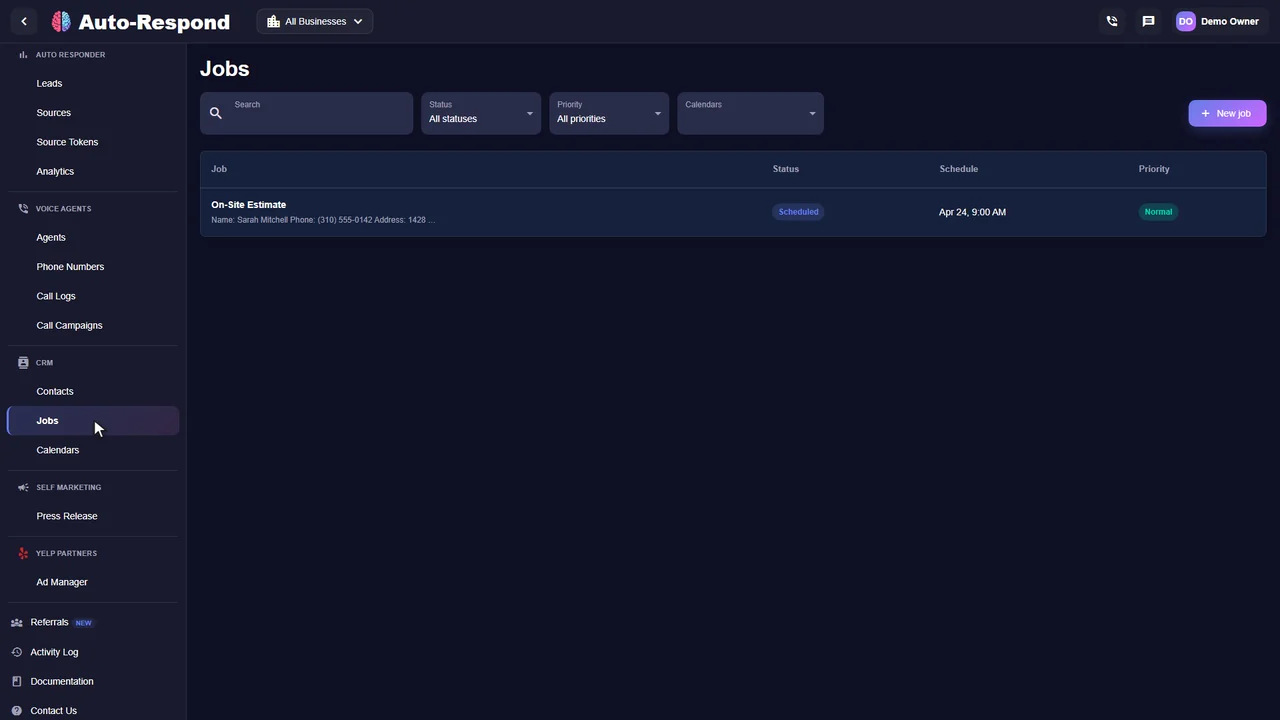
Every after-hours call is logged with its transcript, so the day starts with who called, what they need and what was booked. These are real product screens from our demo business.
Customer stories
Reviews from owners and teams who use it with their own leads.
“I'm usually in bed by 10 PM, but HVAC emergencies don't follow business hours. Now when someone reaches out at 11:47 PM, the AI is there immediately. By morning I have conversation history, customer info, and often a scheduled appointment. Revenue is up year-over-year.”

“I thought it was just an auto-responder, but it's a full employee. It texted the Yelp lead, then immediately called them, negotiated the time, and booked the estimate. I just woke up to the notification. Insane.”

“It handles everything. A lead came in from Thumbtack, the AI texted them, they didn't reply, so the AI called them. It answered their questions about pricing and booked the job. It's a complete sales machine.”

Know the price before you start
The voice agent is $10 a month per number plus $1 per minute. Three things set your bill: how many numbers you keep, how many hours the agent covers, and how long your calls run. A business that forwards only nights and weekends pays for the minutes of those calls, not for staff hours. There is no contract and no setup fee, and eligible first-time customers get a 7-day free trial.
After-hours answering service
Plus $1 per minute of call time.
See how it works for your business.
Start my free trial No setup fee. No long-term contract.A few things you might be wondering
Night hours, emergencies, booking and what callers are told.
Explore the help centerAn after-hours answering service answers your business phone when your office is closed, so callers at night, on weekends and on holidays reach someone instead of voicemail. It can be a live call center or an AI voice agent. The AI version answers from your business details, collects the job, books it when scheduling is on, and transfers urgent calls under rules you set.
Live answering services set their own pricing, so ask how they count calls, minutes and holiday hours before you compare. The Auto-Respond voice agent costs $10 a month per number plus $1 per minute, with no contract and no setup fee, and eligible first-time customers get a 7-day free trial.
Yes. Set the agent's call hours to the times your office is closed, or forward your line only when nobody answers. Inside its call hours the agent answers; outside them, callers hear the voicemail message you wrote.
You write the transfer rules, for example "transfer if the caller mentions a gas leak, water damage or any safety emergency." When a call matches, the agent transfers it to your on-call number. With a warm transfer it briefs your team member privately before connecting the caller. If nobody is on call, turn transfer off for those hours and the agent takes a detailed message instead.
The agent never claims to be human or denies being an AI. If a caller asks whether it is an AI, a bot or whether the call is recorded, it answers directly and honestly.
An AI one can. When scheduling is turned on, the agent checks the availability you configured, offers open times, collects the details you require and books the appointment, following the scheduling instructions you provide.
No. Keep the number your customers already know and forward it to the voice agent's assigned number, either for unanswered calls or for every call after closing.
Yes. On the channels you connect, Yelp inquiries get a job-specific response created in under 2 seconds, and Thumbtack, Facebook, Instagram and Google Local Services Ads leads get an instant reply. When a new lead includes a callable number, the voice agent can call it back instantly.
Your next inquiry could be any minute
Built around your business. Ready when your customers are.