
AI Appointment Setter for Service Businesses

An AI appointment setter is software that contacts a new lead the moment it arrives, by text, platform message or phone call, asks the questions that qualify the job, and books it into the calendar you connect. For a service business, a quote request from Yelp, Thumbtack, Facebook or Google Local Services Ads becomes a scheduled visit while you stay on the job.
With Auto-Respond, the first reply to a new lead is created in under 2 seconds, a voice callback starts instantly when the lead has a callable number, and bookings land in Job Scheduler (Auto-Respond’s own Jobs calendars), Google Calendar, Microsoft Outlook, Cal.com, LeadConnector (GoHighLevel), Housecall Pro, ServiceTitan, FieldPulse or Quickbase, and on calls also in Workiz.
Losing quote requests while you work? Start a 7-day free trial and connect your first lead source in under 2 minutes.
What does an AI appointment setter do, and what does it not do?
An appointment setter, human or AI, has one job: turn a new enquiry into a booked time. Here is that job step by step, and how the AI handles each step in Auto-Respond:
| Step | A human setter | The AI |
|---|---|---|
| First contact | Calls or messages back when free | Creates the first reply in under 2 seconds; calls instantly when there is a callable number |
| Qualify | Asks what, where and when | Asks your service question and required details; turns down services you do not provide |
| Answer questions | From memory or a price sheet | From your business facts and documents, quoting prices only as your pricing settings allow |
| Book | Checks the calendar and writes it in | Offers open times from your connected calendar and creates the appointment |
| Hand off | Passes notes to the owner or tech | Logs each call with recording, transcript and summary; transfers a live call when your criteria are met |
| Follow up | When someone remembers | Runs a sequence such as Day 1, Day 3 and Day 7 that stops the moment the customer replies or books |
What it does not do:
- It does not find leads. It works the supported sources below plus calls to your agent’s number; other lead marketplaces are not covered.
- It does not promise a booking. An instant callback is a response time, not a guarantee that the lead answers or books.
- It does not pose as a person. Every outbound call opens with “Hi, this is [agent name], AI Assistant from [your business].” That line cannot be switched off.
- It does not make up prices. It quotes only what your pricing settings allow; on calls it can offer a free on-site estimate instead.
- It does not talk over you. When you reply manually in a lead’s thread, the AI conversation stops.
How does AI appointment setting put the job on your calendar?
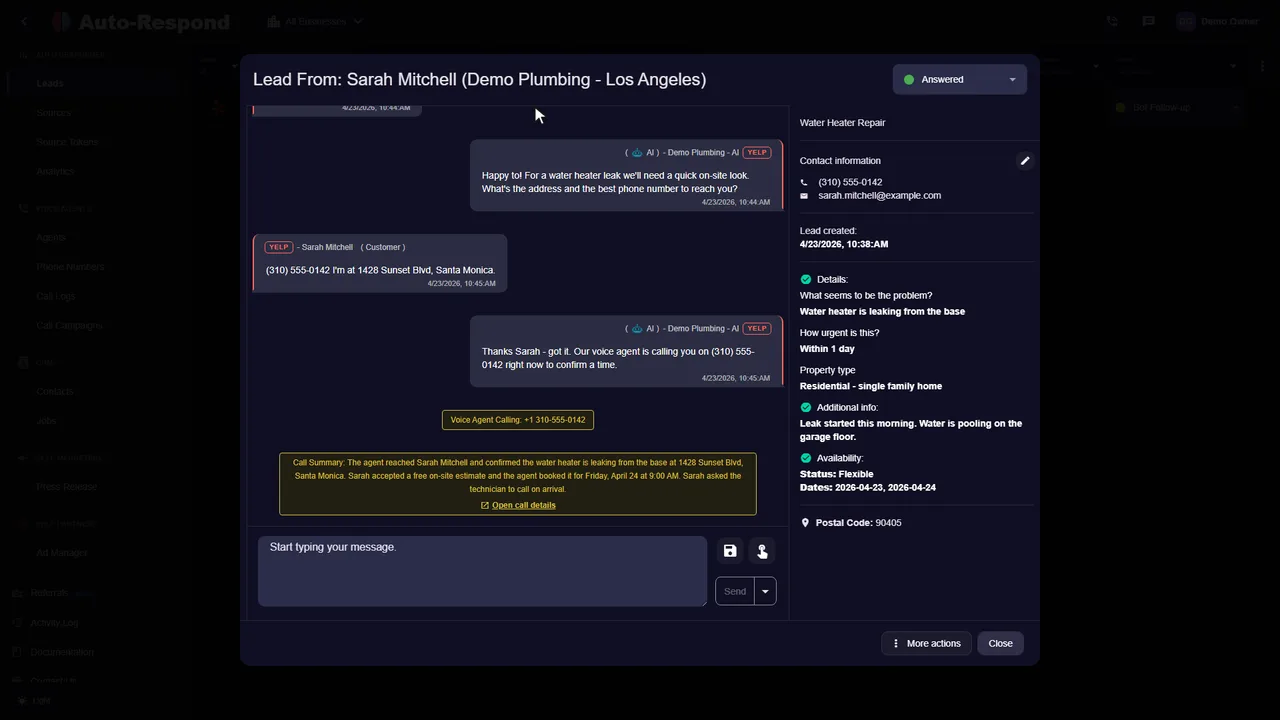
Booking is what separates an appointment setter from an auto-reply. Once the customer agrees to a visit, the same sequence runs on a call or in a chat:
- It offers real times from the calendar you connected. With Job Scheduler in AI mode, it follows your written scheduling rules and checks the jobs already booked.
- It collects what your crew needs. By default: name, service address and phone number. Add fields such as email, ZIP code, time window or gate code. It asks one at a time and skips what it already has from the lead.
- It creates the appointment in your calendar, or as a Job on a calendar inside Auto-Respond with Job Scheduler.
- It reads the time back so the customer knows the visit is set, and on calls the call log records the booking.
Which calendars can an AI appointment setter book into?
| Option | Where the appointment lands | What you enter | Fits a business that |
|---|---|---|---|
| Job Scheduler (the default) | A Job on a Jobs calendar inside Auto-Respond | Scheduling mode (AI, with written scheduling instructions, or Strict) and a calendar; no outside account | wants bookings and Jobs kept inside Auto-Respond |
| Google Calendar | An event in the primary calendar of the Google account you connect | Google account sign-in, appointment duration, working hours, buffer between appointments, scheduling instructions | keeps its schedule in Google Calendar |
| Microsoft Outlook | An event in the calendar of the Microsoft account you connect | Microsoft account sign-in, appointment duration, working hours, buffer between appointments, scheduling instructions | keeps its schedule in Outlook |
| Cal.com | A booking on your Cal.com event type | API key, Event Type ID | already takes bookings through Cal.com |
| LeadConnector (GoHighLevel) | An appointment on an existing GoHighLevel calendar | API key, Calendar ID, Location ID (needs the GHL Unlimited package) | uses GoHighLevel as its CRM |
| Housecall Pro | A customer and a job in Housecall Pro | API key, optional default assignee | dispatches through Housecall Pro |
| ServiceTitan | A booking request in ServiceTitan | Client ID, Client Secret, App Key, Tenant ID, Booking Provider ID, Business Unit ID, Job Type ID (Campaign ID optional) | runs its jobs in ServiceTitan |
| FieldPulse | An appointment in FieldPulse | API key, Company ID | runs its jobs in FieldPulse |
| Quickbase | A new record in your appointments table | Appointments table link, user token, appointment length, working hours | keeps its appointments in a Quickbase table |
| Workiz (voice agents only) | A job in Workiz | Workiz API key, default job type, appointment duration, scheduling instructions | runs its jobs in Workiz and books by phone |
In chat settings, click Validate Connection after entering or changing credentials (Job Scheduler needs none); voice agents have no such button and saving does not test their credentials, so check the key and IDs before going live, or a dead key shows up only when a real customer tries to book. Each lead source picks its own scheduling service and calendar, except that Google Calendar and Outlook connect one account per business, so every source using them books into that account. CRM connections such as HubSpot are separate: they receive the lead and the call summary, while the options above hold the booking. ServiceTitan can be both: a CRM connection, and a scheduling service that takes booking requests. Field-by-field setup is in the scheduling integrations docs.
Can it respect hours, service area and drive time?
Yes, within the rules you write. Scheduling instructions can include service-area, geographic and travel-time rules such as “only book the east side on Thursdays”. With Job Scheduler in AI mode, the AI reads the jobs already booked and their addresses before it offers a time; when addresses are available it compares locations and estimates driving time, which is an estimate, not a live traffic reading. With an outside calendar, set the business timezone on the Timing tab for chats, or the agent’s Calling hours timezone for calls, or bookings come out at the wrong time; Job Scheduler uses its own calendar’s timezone.
Which leads trigger the AI appointment setter?
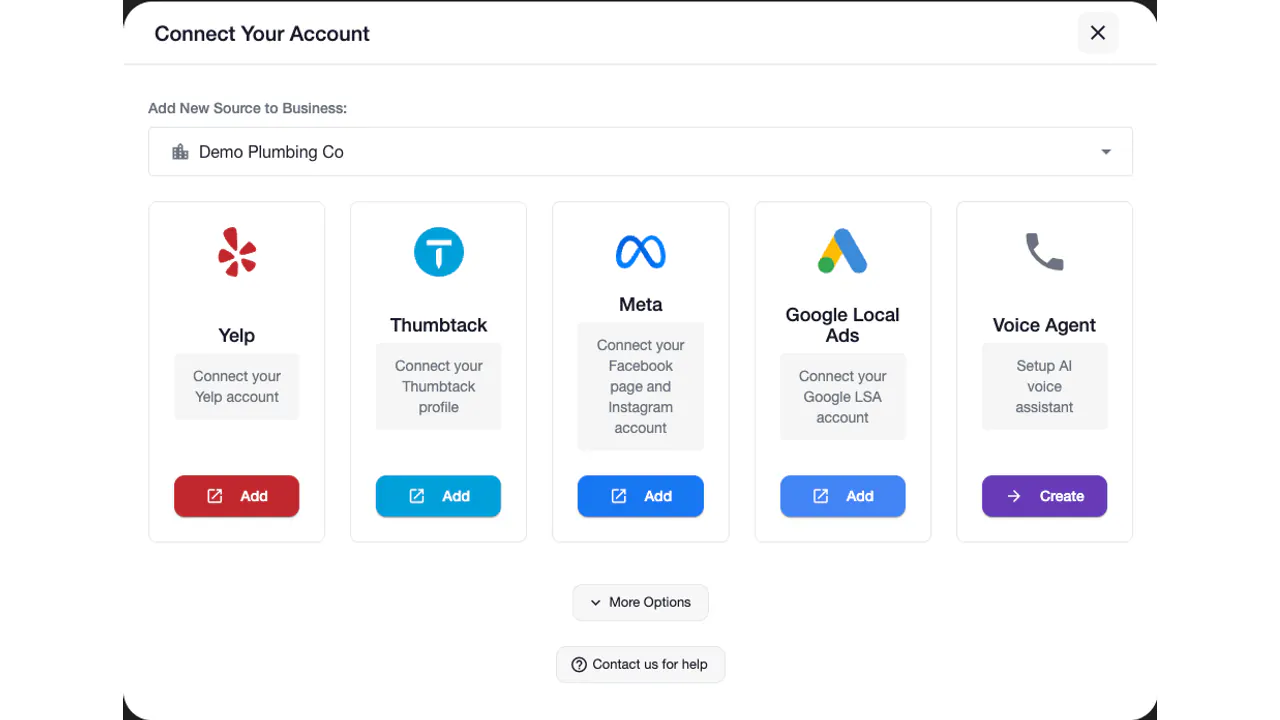
Every supported source starts it, but the first contact, and when a call is possible, depend on the source:
| Lead source | First contact | When the AI can call | Price |
|---|---|---|---|
| Yelp Request a Quote | The AI creates a job-specific response in under 2 seconds | Once the customer chooses to share a phone number on Yelp | $99/month per Yelp source |
| Thumbtack | Replies instantly in the Thumbtack conversation | When the customer shares a number in the conversation | $99/month per Thumbtack source |
| Facebook Lead Ads | No chat on a lead form; the AI voice agent calls the lead | Instantly, since the form usually includes a phone number | $19/month |
| Google Local Services Ads | Replies instantly in the lead’s message thread | Instantly when the lead carries a phone number, which Google usually includes | $49/month |
| Facebook Messenger | Replies instantly in Messenger | Only after the customer types a number in the chat | $49/month |
| Instagram DMs | Replies instantly in the DM | Only after the customer types a number in the chat | $49/month per Instagram source |
| Voice agent (calls for any source above) | Places and answers the calls | Whenever a condition above is met | $10/month per phone number + $1/minute of talk time |
Calls that come to you count too: an answering agent picks up calls to its number or your forwarded business line and books them into your calendar. To text back missed calls instead, see missed call text back; for handling every source from one account, see lead response automation.
Can an AI appointment setter book by phone and by text?
Yes. Point the chat scheduling and the voice agent’s scheduling at the same calendar, and a job booked in a chat and one booked on a call land in the same place.
- By text or platform message. On the lead’s own channel, and on SMS if you turn on SMS messaging, set the channel to AI Assistant, choose Short conversation (up to five messages) or Long conversation (up to ten), and enable scheduling. In “Only welcome message” mode the AI creates the first reply and stops, so it never reaches the booking.
- By phone. A calling agent dials each new lead with a callable number; an answering agent books inbound callers. Both check the calendar during the call.
Calls suit urgent work (a leak, no heat) and form leads who expect the phone to ring; text suits customers who started in a chat without sharing a number. Outbound calls follow your call schedule, so a lead that arrives at 2 a.m. is called when your window opens, while the written reply is created in under 2 seconds. When nobody picks up, the agent leaves your voicemail message and logs the call as missed, and on chat channels your follow-up sequence keeps the thread alive.
AI vs a human appointment setter: which fits your business?
AI fits high-volume home-service leads where the questions repeat and the first business to respond has the edge. A person still wins on complex, high-ticket jobs. You can also run both: AI for first contact and routine bookings, your team for the rest.
| Criterion | AI appointment setter | Human appointment setter |
|---|---|---|
| Hours covered | Every hour you allow; outbound calls follow your call schedule | The hours someone is scheduled to work |
| First contact | Reply created in under 2 seconds; callback starts instantly | When they are free |
| Cost | $19 to $99/month per channel, plus $10/month per phone number and $1 per minute of talk time for calls | Wages for every hour covered, plus hiring, training and cover for time off |
| Consistency | Asks your required questions every time; quotes only the prices you allow | Varies with workload and experience |
| Judgment | Follows your rules; transfers when your criteria are met | Reads the situation, negotiates, handles unusual requests |
Speed is where the gap shows. In the MIT Lead Response Management Study by Dr. James Oldroyd, waiting from 5 to 30 minutes made a lead 100x less likely to be contacted and 21x less likely to be qualified (MIT study).
A person is the better choice when:
- The price depends on a site visit and a conversation, as with large remodels or commercial bids with several decision makers. Let the AI book the visit, not sell the job.
- The caller asks for a human. Set transfer criteria; on a warm transfer the agent briefs your team privately first.
- It is a complaint or a warranty claim. Existing customers with a problem belong with your team.
To judge it on your own numbers, run it on one source for a month and track pickup rate, booked jobs and cost per booked job. Voices, call transfer and the other calling features are on the AI voice agent page.
Is it legal for AI to call and text your leads?
It can be, when the person has agreed to be contacted and you can show how. On February 8, 2024 the Federal Communications Commission adopted a Declaratory Ruling recognizing calls made with AI-generated voices as “artificial” under the Telephone Consumer Protection Act. That holds AI calls to the same standards as prerecorded calls, including prior express written consent before telemarketing robocalls (FCC release).
The working rule: contact people who reached out to you about a job, keep the record of how they did, and stop the moment they ask. Auto-Respond builds that in:
- Spoken opt-outs end the call. “Stop calling” puts the number on your suppression list, and calls already planned to it are canceled.
- Text opt-outs cover calls too. A reply of STOP, QUIT, END, REVOKE, OPT OUT, CANCEL or UNSUBSCRIBE blocks texts and calls to that number.
- The suppression list is checked before every call and text, and each attempt and opt-out is stored with its lead source.
- Texting needs US carrier registration, approved before any text goes out: one-time fees of $5 for brand registration when a new one is required and $15 for each new campaign submitted for review, $2/month while active, plus $0.05 per text segment sent.
This is general information, not legal advice: consent depends on the lead source, the purpose of the contact and state law, so check with your attorney before turning on automatic calls.
How do you set up an AI appointment setter?
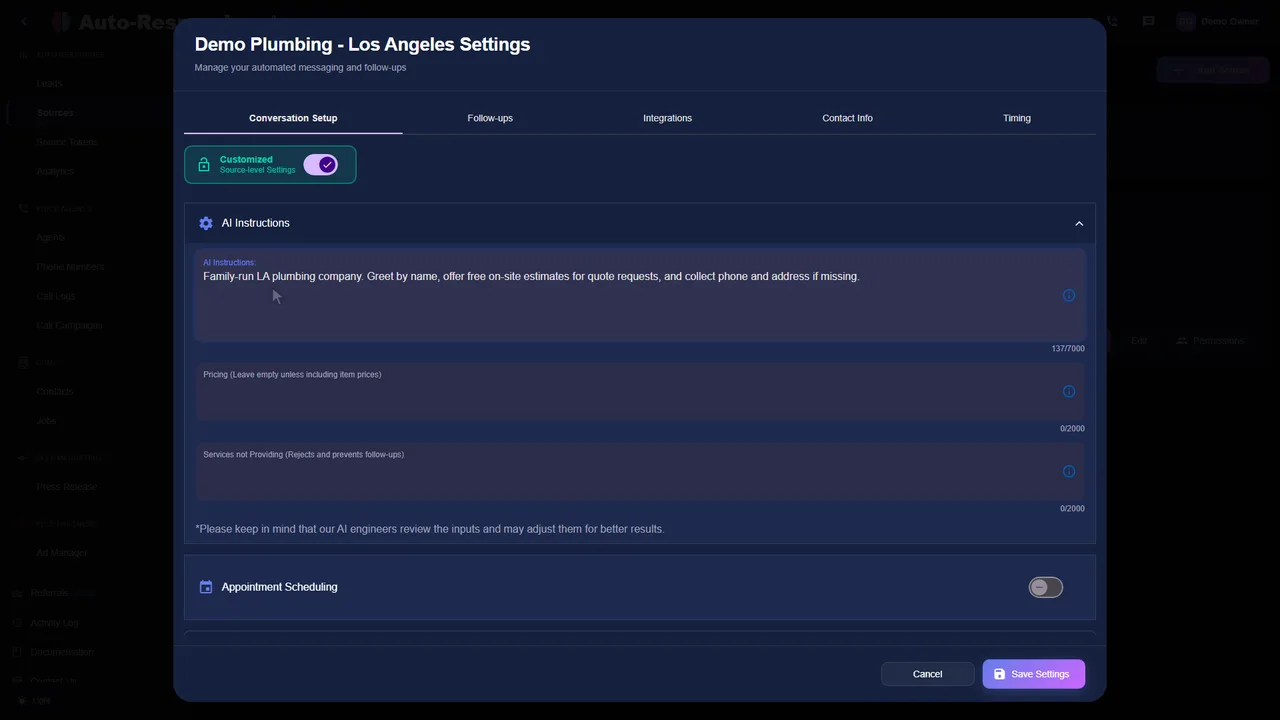
- Connect your lead sources on the Sources page by signing in to each platform; connecting a source takes under 2 minutes.
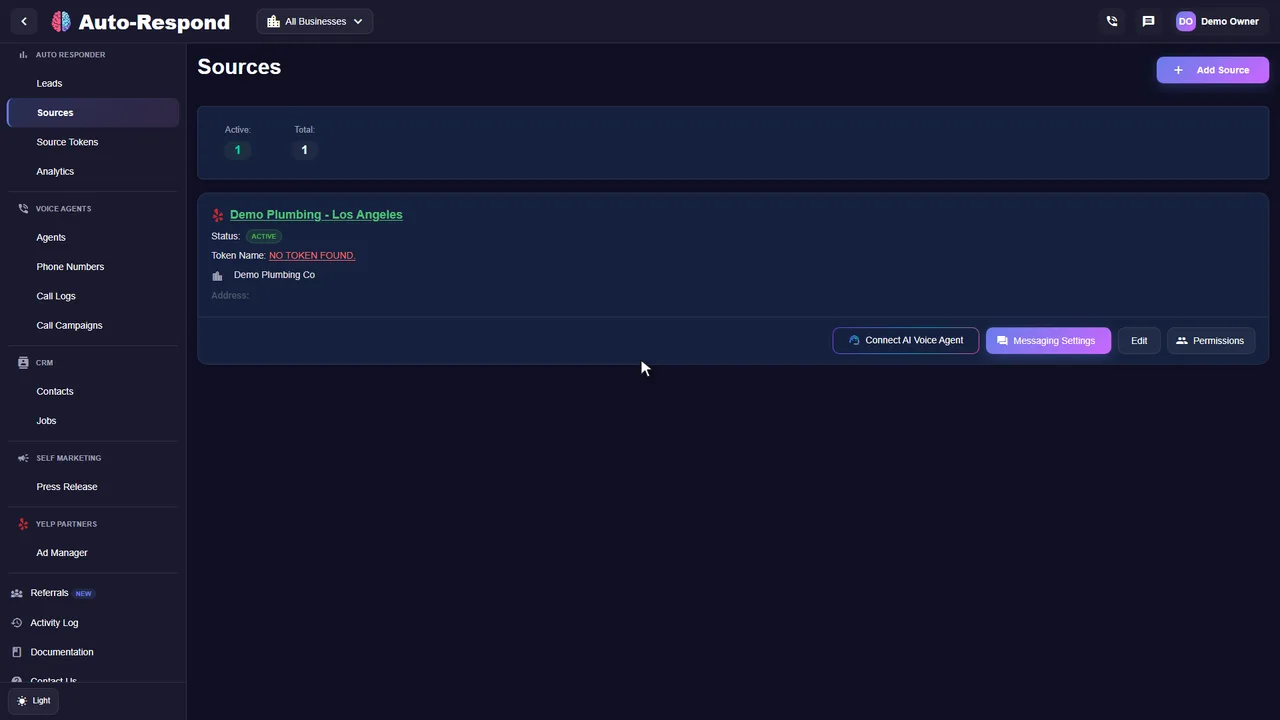
- Write your business facts: services, service area, hours, the prices or ranges you will quote, and the services you do not provide. A source’s chat channels share them; give the voice agent the same details in its knowledge base.
- Choose where bookings land, for the chat channels and the voice agent: pick a scheduling service and a calendar, check the connection, set the timezone (the Timing tab for chats, the agent’s Calling hours for calls), and add any fields your crew needs beyond name, address and phone.
- Turn on booking in chats: AI Assistant, Short or Long conversation, scheduling enabled.
- Turn on booking by phone: create a calling agent, connect your sources, set its call schedule and voicemail message, and add a transfer number for live handoffs.
- Test it as a customer: send a test lead with your own phone number, book a slot, and check your calendar and the call log.
Three settings cause most missed bookings: a timezone set wrong for the business, an API key or ID from a different account, and a chat channel left on “Only welcome message”. More pitfalls are in voice agent setup mistakes; every price is on the pricing page.
Frequently asked questions
Can an AI appointment setter book into Google Calendar or Outlook?
Yes. In Auto-Respond, choose Google Calendar or Microsoft Outlook as the scheduling service and sign in to the account: the AI appointment setter books each appointment as an event in the connected calendar (with Google, the primary calendar of that account). It can also book with Job Scheduler, Cal.com, LeadConnector (GoHighLevel), Housecall Pro, ServiceTitan, FieldPulse or Quickbase, and on calls with Workiz.
How much does an AI appointment setter cost?
With Auto-Respond you pay for each lead source you connect, $19 to $99 per month per channel, and for calls $10/month per phone number plus $1 per minute of talk time, each completed call rounded up to the next whole minute. There is a 7-day free trial, no contract, no setup fee and no per-lead fee. A voice agent number bought outside the free trial also has a $10 one-time provisioning fee.
What is the difference between an AI appointment setter and a customer service representative?
An appointment setter works new leads: first contact, qualifying the job and booking a time. A customer service representative mostly helps existing customers with questions, changes and problems. An AI appointment setter covers the first role; when an existing customer calls, an answering agent can take the call and transfer it to your team when your transfer criteria are met.
Can an AI appointment setter reschedule or cancel a booking?
In text conversations, yes, for calendar integrations that support it: the AI appointment setter checks availability again and updates the booking. Anything your rules do not cover is better left to your team, and a manual reply from you in the thread stops the AI conversation so you can take over.
Put your next lead on the calendar
Connect one lead source and one calendar, send yourself a test lead, and watch the booking land. Start a 7-day free trial or email support@auto-respond.com with questions about connecting your calendar.